How we kept non-technical users from eating up our AI budget
/ 4 min read
Table of Contents
How we woke up the sleeping dragon
We rolled out Open WebUI to a whole organization with thousands of employees. It is one of the most popular options for an open-source, self-hosted AI chat platform.
While developers were already heavily using GenAI inside the organization, we also wanted to empower non-technical employees to benefit from it. Open WebUI’s user-friendly interface is a perfect match for this.
Soon after the roll-out we realized that the token costs quickly went through the roof. While we expected costs to increase when onboarding more users, we were surprised by the factor by which they increased.
We spent some time digging through our monitoring, and investigating usage patterns.
What we changed
Based on our conclusions, we implemented changes that combined reduced costs by almost 40%, without negatively impacting the user experience.
1. Use a cheaper model as the default model
Our monitoring showed that the default model is always the model with the most requests. This is a strong indicator that a lot of users might not even be aware that there are different models they can choose from.
As such, changing this model also gives us the biggest lever for reducing overall costs.
We decided to configure a model that is the cheapest in the frontier line-up (e.g. Claude Haiku or Gemini Flash).
Another approach worth testing is to use an auto router, like the one built into LiteLLM. It tries to automatically choose the best model, based on the complexity of the task.
2. Use emojis to indicate model capabilities and costs
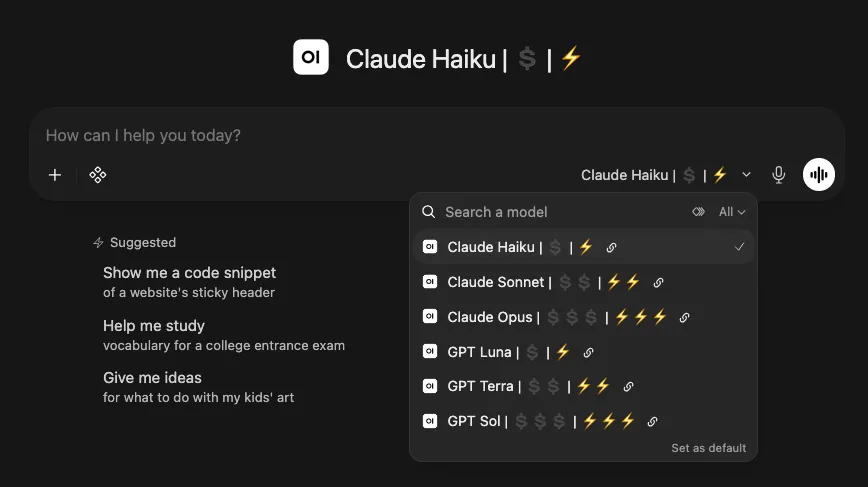
A lot of non-technical users don’t know which models or versions exist and when to use which. And they are not to blame for this. Why would they spend time learning this, if all they want is to simply get a response from the AI?
They simply used the model they probably heard of being the best for all tasks, regardless of the complexity of the task at hand they want to solve.
We also don’t want them to spend their time reading through documentation in order to learn which model offers which capabilities, especially if the models evolve at the current rate.
The solution we came up with is quite simple: We add emojis to each model name to indicate the model’s capabilities and its relative costs on a scale from one to three.
model-name | 💲💲💲 | ⚡️⚡️⚡️The first emoji shows costs, while the second shows the power.
3. Put most expensive models behind access groups
Claude Opus and GPT Sol are very powerful models, but also very expensive. There are valid use cases that need the power of those frontier models - proofreading an email isn’t one.
We decided to not give every user access to the most expensive models and put them behind an access group. Of course this change has to be announced ahead to avoid surprises.
Gaining access to this group is simple, all it takes is to open a support ticket to be automatically added. There is no lecture to read through (although this would for sure be beneficial) or quiz to complete.
As it turned out, almost exclusively technical users ask for being added to the group and the usage of those models dropped significantly.
4. Display costs attached to each message

Another observation we made when talking to non-technical users is, that some of them were quite surprised when we explained to them that there are costs attached to each message they are sending.
By default this information is not displayed in Open WebUI at all.
I developed a filter function that displays the costs attached to each message directly above it.
You can find more information in my last post.
This greatly raised the awareness for how each individual contributes to the overall costs.
Wrapping up
None of these measures required a lot of effort, but together they made a real difference. The key takeaway for us was simple: most users don’t want to think about models or costs, they just want a working chat.