Claude Code: Remove a Working Directory from a Session
/ 2 min read
Table of Contents
How to add Working Directories
By default, when using Claude Code, the agent only has access to the working directory in which it is running. However, when working on multi-repo projects, I often find myself in need of adding further directories as context to the session.
As per Claude Code documentation, there is a simple command to do this: --add-dir <path> or /add-dir <path>.
How to remove Working Directories
To my surprise, there is no remove-dir command to remove a directory that’s no longer needed or was added by accident. And it seems I’m not the only one, as a quick Google search surfaced multiple GitHub issues about this:
- Add /remove-dir command to remove session-added working directories #27935
- Feature Request: Add Workspace/Directory Removal Option in Claude Code #2882
- [BUG] unable to remove a dir added with /add-dir #41323
The recommended workaround is to simply restart the current session, which resets manually added working directories. While it does work, I don’t like having to close Claude Code every time.
While playing around with the Claude Code settings, I found a way to remove a working directory that was added without restarting the session.
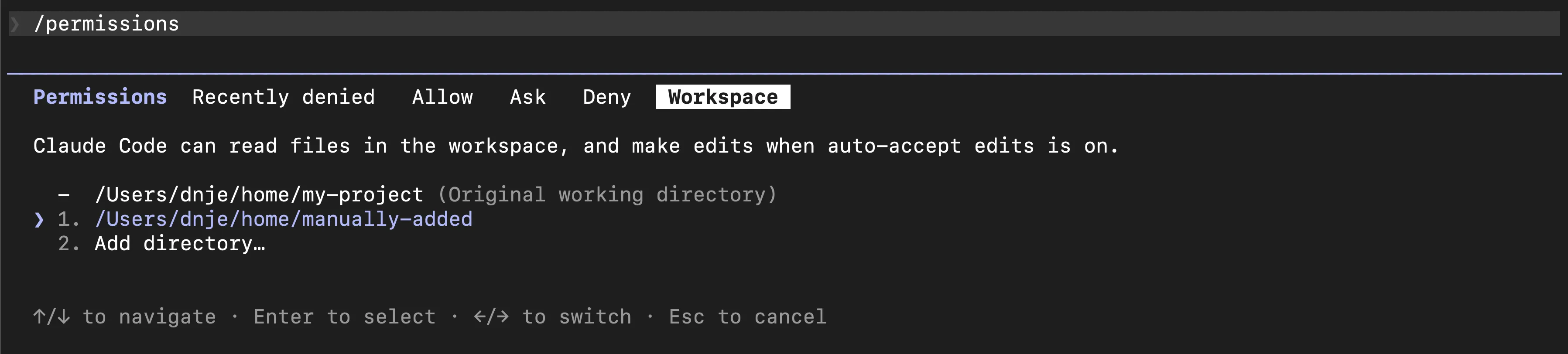
Use /permissions and navigate to the Workspace tab. It shows all the working directories Claude can read in the current session.
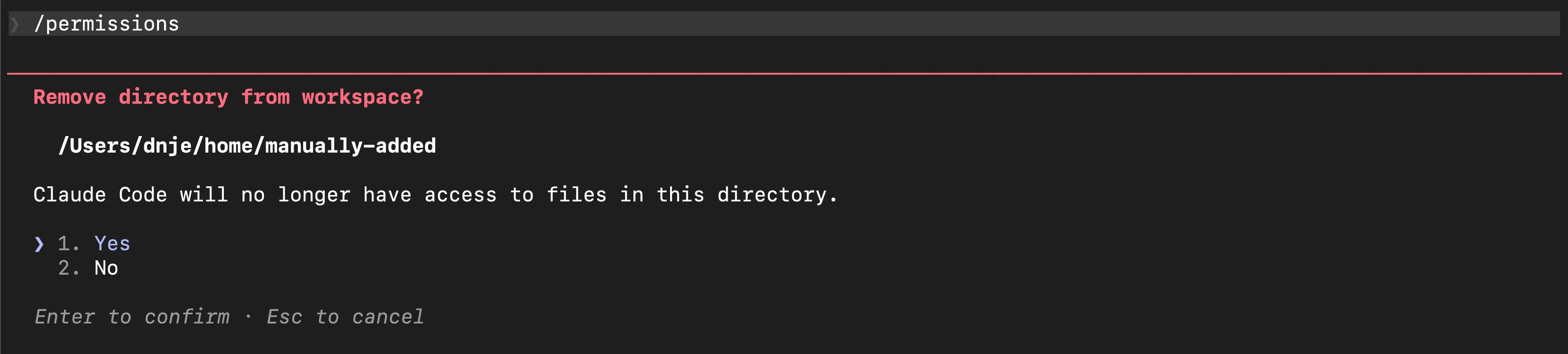
When selecting a specific directory, one has the option to remove it from the current session.
That’s it - no more restarts needed!